
Blender add-on
Build-Up FX
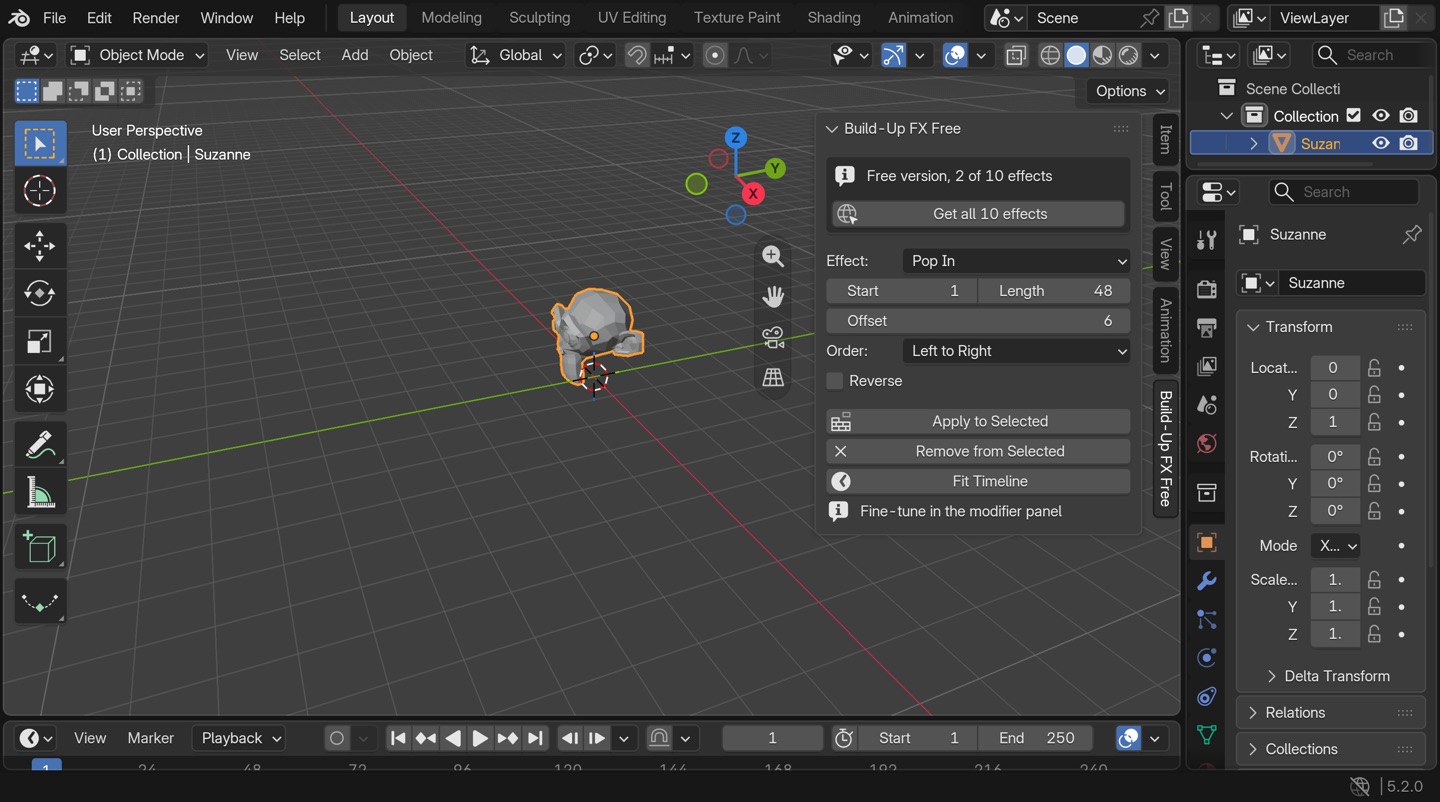
Pick a mesh, pick an effect, click Apply. Your object builds itself on screen, and the last frame is your original mesh, untouched.
$9$14
Launch price until Thursday 5 November, then $14.
Checkout opens in a few days
Instant download. Personal and commercial use. Or grab the free version with two effects.
Ten effects
Every effect is a Geometry Nodes modifier you can tweak after you apply it.
| Assemble | Pieces fly in from one side and lock into place. |
|---|---|
| Scatter In | Pieces gather from every direction. |
| Fall and Settle | Parts drop from above and bounce to rest. |
| Pop Infree | Parts scale up with a springy overshoot. |
| Growfree | The shape rises out of the ground along an axis. |
| Dissolve In | Faces appear through a noise pattern. |
| Layer Stack | Slice by slice from the bottom, like a 3D print. |
| Ripple Reveal | A wave spreads from a point and lifts faces into place. |
| Wireframe Draw | Edges draw on, then the surface fills in. |
| Voxel Build | Cubes stack into the shape, then turn into the real mesh. |
How it works
- Select one or more meshes.
- Pick an effect, a start frame and a length.
- Set the Offset and Order if you have several objects, so they build one after another.
- Click Apply to Selected. Fit Timeline sets the scene range for you.
Tick Reverse and the object takes itself apart instead.
Questions
- Which Blender versions?
- Blender 5.0 and newer. Every effect is render tested on 5.2.
- Does it work on my model?
- It works on any mesh. Voxel Build looks best on closed meshes.
- What do I get?
- The add-on zip, a .blend asset library with all ten node groups (so you can drag effects in from the Asset Browser without the add-on), and a short install guide.
- Can I use it in client work?
- Yes. The add-on is GPL-3.0, your renders and animations are yours.
- How do I install it?
- Edit, Preferences, Get Extensions, the dropdown at the top right, Install from Disk, then pick the zip. The panel shows up in the N sidebar under Build-Up FX.
- What if it does not work for me?
- Email hello@polyember.com. If we cannot fix it, you get your money back. See the refund policy.